
The Best Auto Caption Plugins for Adobe Premiere Pro in 2026Ranked by free tier, language support, accuracy, and workflow — not marketing copy.
We tested every major Premiere Pro caption plugin against the same criteria: does it have a real free tier, how many languages does it support, how accurate is the transcription, and does it get out of your way. Here is the full ranking.
Key Takeaways
- CaptionX is our #1 pick — the only Premiere Pro caption plugin with a genuine free tier (no credit card), the widest language support at 100+, and a caption-first workflow right on your timeline.
- AutoCut is the runner-up but is a multi-tool suite — you pay for silence removal and zoom cuts whether you want them or not, with no free tier to evaluate caption quality first.
- Firecut renders captions as PNG sequences, so fixing a single word means re-rendering — friction on any long-form project that needs late corrections.
- Captioneer, Premiere Assistant, Submachine, and Brevidy all require payment up front or add manual/motion-graphics steps that slow down straightforward captioning.
Quick Verdict
CaptionX is the best caption plugin for Premiere Pro in 2026. It is the only plugin with a genuine free tier (free to start, no credit card), the widest language support at 100+, and a workflow built entirely around captioning — not bundled with tools you do not need. Every other plugin on this list asks you to pay before you can evaluate it, or makes captioning a secondary feature of a broader product.
How We Ranked These Plugins
Caption plugins are not all competing on the same playing field. Some are caption-only tools. Others bundle captions into a suite of 10 other features and charge you for all of them. We ranked on what actually matters to a Premiere Pro editor:
- Free tier — Can you generate captions before paying? Is it a real free tier or a 2-minute trial?
- Language support — How many languages are supported? Breadth matters for international content.
- Caption-first focus — Is the tool built for captioning, or is captioning a checkbox feature?
- No credit card to start — Can you evaluate the tool without entering payment details?
- Transcription accuracy — Does the output require heavy correction or is it production-ready?
- Pricing value — What do you actually pay for what you get?
#1 — Our Pick
CaptionX — The Best Caption Plugin for Premiere Pro
Why it wins
Free to try with no credit card. 100+ languages. Caption-first workflow inside Premiere Pro. Instant results with no upload, no export, no waiting. The only plugin on this list that is free to start, no credit card.
CaptionX is installed directly inside Adobe Premiere Pro as a native extension. Open your sequence, select your language, and click Generate. Captions appear on your timeline in seconds — not minutes — because nothing leaves your machine. No server upload, no processing queue, no download step. Your edit stays live throughout.
The 100+ language roster covers Arabic, Chinese, Hindi, Portuguese, Vietnamese, Indonesian, Ukrainian, Turkish, French, and dozens more. For editors working on international content or multilingual productions, no other Premiere Pro plugin comes close to this coverage.
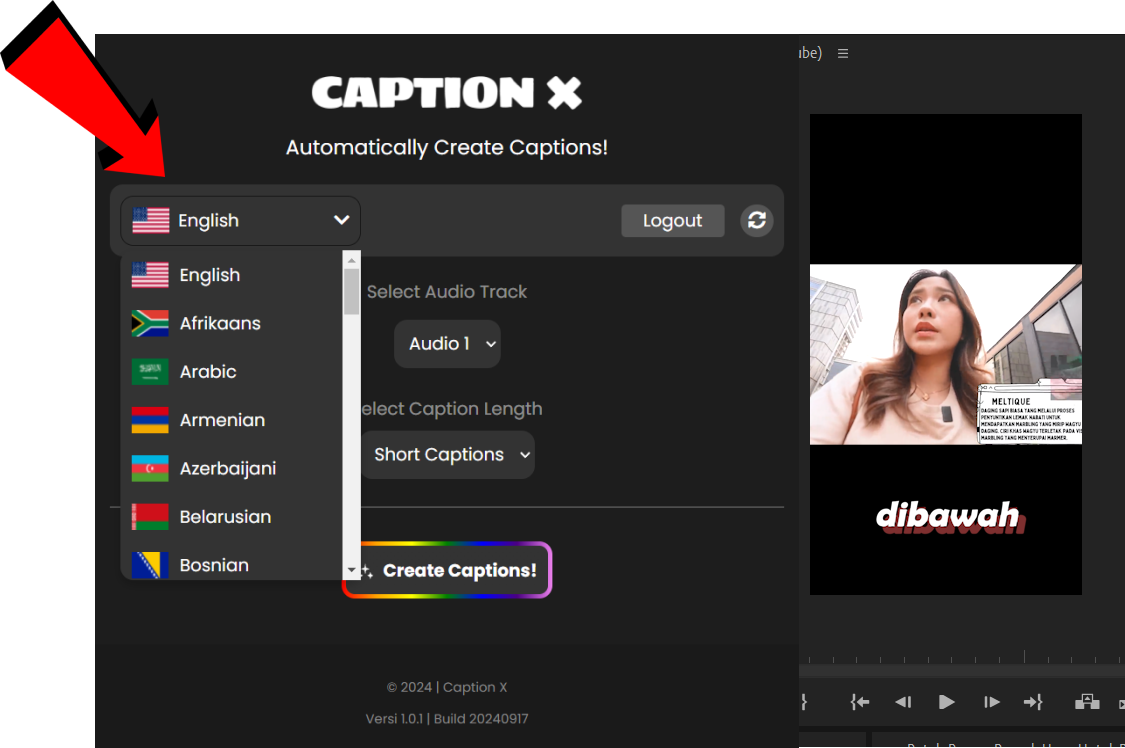
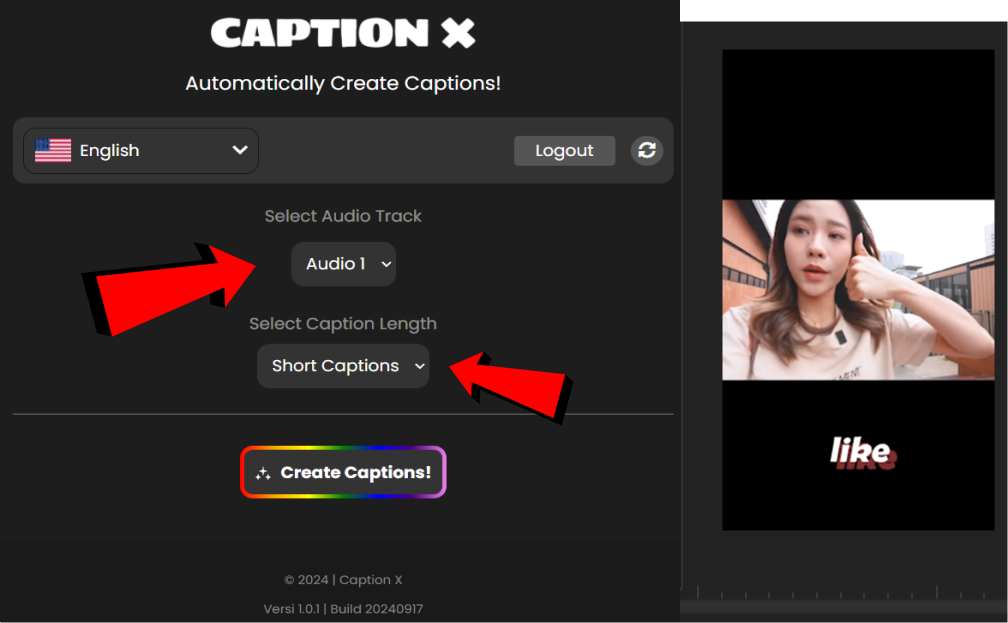
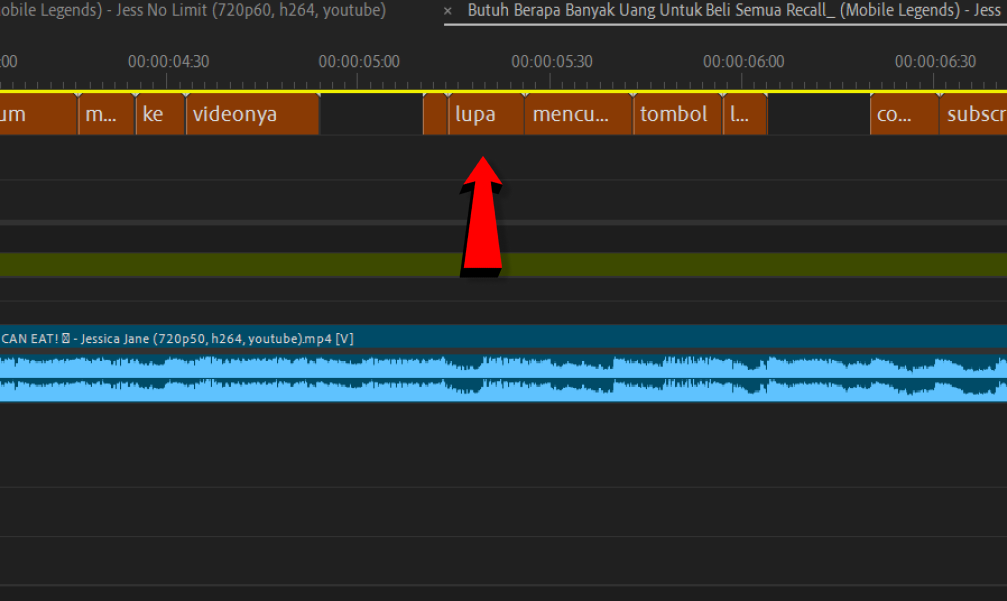
What separates CaptionX from every other plugin on this list is that captioning is the entire product. There is no bundled silence remover you do not want, no AI clip repurposing tool you are paying for but never open. Every update, every feature, every design decision is made around one question: how do we make captioning faster and more accurate inside Premiere Pro?
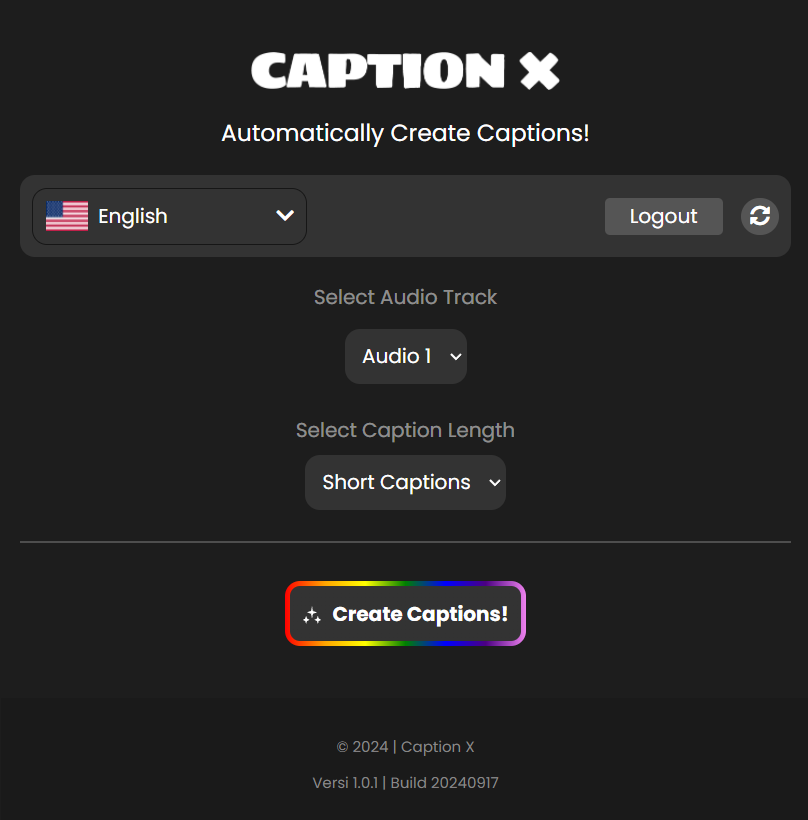
The free tier is genuine. CaptionX is free to start, no credit card required. Try it on real footage, evaluate the accuracy, and upgrade only when your volume demands it.
Free tier
Free to start, no card
Languages
100+
Workflow
100% inside Premiere Pro
Runner Up
AutoCut — Powerful, But You Pay Before You Start
The core problem: AutoCut is a multi-tool suite. You are not buying a caption plugin — you are buying silence removal, zoom cuts, chapter markers, and eight other tools bundled together. If you want captions, you pay for all of it whether you use it or not, and there is no free tier to evaluate whether the caption quality justifies the cost.
AutoCut works inside Premiere Pro and generates captions that are accurate enough for most workflows. The transcription engine is competent. The interface is functional. If you were already paying for AutoCut for its silence removal or zoom features, the captions are a reasonable addition at no extra cost.
But if captions are your primary need, AutoCut is the wrong starting point. You cannot try the caption quality before committing to a subscription. Language support is more limited than CaptionX. And the dashboard is built around navigating between a dozen different tools — not around getting captions onto your timeline as fast as possible.
For editors who specifically want to compare CaptionX and AutoCut on silence removal and captions side by side, we have a full CaptionX vs AutoCut breakdown that goes deeper on the differences.
Free tier
No
Languages
Limited
Caption-first
No — multi-tool suite
Third Place
Firecut — Good Templates, Limited by How It Renders Captions
The core problem: Firecut renders captions as PNG image sequences. Once your captions are placed, editing a single word means re-rendering — not a quick text fix. For editors who need to iterate on caption accuracy or make late-stage corrections, this creates unnecessary friction.
Firecut has genuine strengths. The template library is solid, emoji support works well for social content, and caption positioning via drag-and-drop is intuitive. For editors producing short-form content where captions are locked after the first pass, the PNG rendering limitation is manageable.
For professional long-form work — interviews, documentaries, corporate video — it becomes a problem. When a client requests a correction after delivery, or when you realize the transcription got a proper noun wrong, the re-render requirement adds time that should not exist. CaptionX keeps captions as native, editable text tracks on your Premiere timeline. Corrections take seconds.
Language support is also narrower than CaptionX, and Firecut does not offer a genuine free tier. The pricing requires a paid plan for meaningful production use.
Free tier
No free tier
Languages
Limited
Caption editing
Re-render required
Fourth Place
Premiere Assistant — Template-Heavy, Not Built for Speed
The core problem: Premiere Assistant is a motion graphics-oriented tool first. The caption onboarding is complex, the learning curve is steep compared to every other plugin on this list, and there is no free tier to justify the time investment before paying.
Premiere Assistant produces visually impressive results. The template variety is wide, near-real-time animated previews are useful for template selection, and the cloud font support is a genuine advantage for branded productions. Editors who prioritise caption aesthetics over speed will find value here.
But getting to those results takes longer than it should. The setup process is not intuitive for editors who simply need accurate captions on their timeline without a 30-minute onboarding session. And without a free tier, you are committing money before you know whether the workflow suits you. CaptionX lets you generate captions on real footage, judge the accuracy, and decide — all before entering a card number.
Free tier
No
Learning curve
Steep
Best for
Styled motion captions
Fifth Place
Submachine — Professional Output, Manual Workflow
The core problem: Submachine is built on MOGRT technology, which means more manual steps between transcript and finished captions. The workflow requires more editor intervention than tools like CaptionX or Firecut. For editors who want to click once and get captions, Submachine is the wrong fit.
Submachine appeals to motion graphics editors who want highly customised caption animations and are willing to invest the time to configure them. The MOGRT-based approach gives it flexibility that simpler tools cannot match — but that flexibility comes at the cost of simplicity.
For editors who caption regularly and need to move fast, the manual steps add up. There is no free tier, language support is narrower than CaptionX, and the tool is primarily designed for editors comfortable with motion graphics workflows rather than those who want captions as a quick, integrated step in their edit.
Free tier
No
Workflow
Multiple manual steps
Best for
Motion graphics editors
Sixth Place
Brevidy — Caption-Only, But the Price Does Not Match the Feature Set
The core problem: Brevidy charges $14.99/mo for a caption-only subscription tier with a narrower feature set and fewer languages than CaptionX — which is free to try. The pricing is hard to justify when a more capable alternative exists and costs nothing to start.
Brevidy is a focused caption tool, which is a point in its favour compared to the multi-tool suites on this list. The translation capabilities are a genuine feature and useful for editors working across languages.
But at $14.99/mo with no free tier and limited language breadth, the value proposition is weak against CaptionX. You are paying more for less — fewer languages, fewer features, and no way to evaluate the quality before you pay. For editors choosing a caption-only tool, CaptionX is the obvious starting point.
Free tier
No
Price
$14.99/mo (captions only)
Languages
Limited
Side-by-Side Comparison
| Feature | CaptionX | Captioneer | AutoCut | Firecut | Premiere Assistant | Submachine | Brevidy |
|---|---|---|---|---|---|---|---|
| Free tier (no card) | |||||||
| No credit card to start | |||||||
| Caption-first product | |||||||
| Languages supported | 100+ | 99+ | Limited | Limited | Limited | Limited | Limited |
| Starting price | Free to try | ~$15/mo (trial) | Paid plan required | From ~$9/mo | Paid plan required | Paid plan required | $14.99/mo |
Which Caption Plugin Should You Use?
If you are a Premiere Pro editor who needs accurate captions fast, in multiple languages, without paying to evaluate the tool — CaptionX is the answer. Install it, generate captions on your real footage, and judge the quality before you spend a dollar. No other plugin on this list offers that.
If you are already paying for AutoCut and are satisfied with the bundle, the captions are a reasonable bonus — but do not choose AutoCut for captions alone.
If you also work in After Effects, or specifically want a library of animated preset captions, Captioneer is the strongest like-for-like alternative on this list — it's caption-first too. Just go in knowing it's trial-then-paid and plugin-only, with no genuine free tier and no browser version to fall back on.
If you produce short-form social content and prioritise aesthetic templates over editorial flexibility, Firecut is worth a look — but know going in that the PNG rendering will create friction on any project requiring post-placement edits.
For everyone else: start with CaptionX. It is free to try, takes five minutes to install, and generates captions on your first sequence before you have time to second-guess it.
Want a head-to-head? Compare CaptionX to every caption tool, or read the focused AutoCut alternative and CaptionX vs Captioneer breakdowns.
Frequently Asked Questions
What is the best AI plugin for captions in Premiere Pro?
CaptionX is the best AI caption plugin for Premiere Pro — AI speech recognition generates accurate, styleable captions in 100+ languages directly on your timeline, with a genuine free tier and no watermark. Unlike all-in-one 'AI plugin' suites, it's caption-first, so it does that one job better.
Is CaptionX an AI caption plugin?
Yes — CaptionX uses AI speech-to-text to transcribe your audio and place timed captions on your Premiere Pro timeline automatically in 100+ languages, then lets you restyle them or export an SRT.
What is the best caption plugin for Adobe Premiere Pro?
CaptionX is the best caption plugin for Adobe Premiere Pro. It generates accurate captions in 100+ languages directly inside your Premiere timeline in seconds, offers a free tier with no credit card required, and is the only caption-first plugin built exclusively around professional captioning workflows.
Is there a free caption plugin for Premiere Pro?
Yes. CaptionX is free to start — no credit card required. Most other Premiere Pro caption plugins require a paid subscription before you can generate your first caption.
How do I automatically add captions in Premiere Pro?
Install CaptionX from the Adobe Creative Cloud marketplace, open your sequence in Premiere Pro, and click Generate. Captions appear on your timeline in seconds — no upload, no export, no external tool required.
Is CaptionX better than AutoCut for captions?
Yes, for pure caption generation. CaptionX is a caption-first tool — every feature is built around accurate, fast, styleable captions in 100+ languages. AutoCut is a multi-tool suite where captions are one feature among many, and it requires a paid plan before you can generate captions. CaptionX is free to start, no credit card.
Is there a free Captioneer alternative?
Yes — CaptionX is a native Premiere Pro caption plugin that is free to start, no credit card, plus a free browser version and free subtitle tools. Captioneer is a free trial then paid, and works only as a plugin. See our full CaptionX vs Captioneer comparison for the breakdown.
What are the weaknesses of Firecut for Premiere Pro?
Firecut renders captions as PNG sequences, which means once captions are placed, editing individual words requires re-rendering rather than a simple text edit. It also supports fewer languages than CaptionX and has a more limited free tier.
Which Premiere Pro caption plugin supports the most languages?
CaptionX supports 100+ languages, more than any other dedicated Premiere Pro caption plugin. This includes Arabic, Chinese, Hindi, Portuguese, Vietnamese, Indonesian, Ukrainian, and dozens more.
Related articles
Free to try — no credit card required
Try the Best Caption Plugin for Premiere Pro
Free to start, no credit card. 100+ languages. Captions on your timeline in seconds — not minutes.