
Captioneer Premiere Pro Plugin vs CaptionX: Is Captioneer Free? Price, Trial and a Free-to-Start Alternative
CaptionX does the job Captioneer does, in more editors, with more tools, for less per month. And it's free to start. Captioneer has no free plan: a 14-day trial for short-form captions, then $15.00 USD a month or $150.00 USD one-time, plus any applicable tax (US prices, Oct 2026).
CaptionX isn't affiliated with or endorsed by Captioneer LLC.
Over 80,000 sign-ups in 140+ countries. More than 30,000 hours of audio and video transcribed.
Key Takeaways
- Captioneer has no free plan. It has a 14-day trial for short-form captions, then costs $15.00 USD a month or $150.00 USD one-time per licence, plus any applicable tax (Oct 2026).
- CaptionX is free to start, with no expiry date. In the US, Pro is $13.95 USD a month, less than Captioneer's $15.00 USD, or $139.00 USD a year. Captioneer has no yearly plan.
- CaptionX runs in more places. Premiere Pro, After Effects, DaVinci Resolve and your browser. Captioneer runs in Premiere Pro and After Effects, and its FAQ rules out DaVinci Resolve and Final Cut Pro.
- CaptionX does more than captions. A Silence Remover, Eye Contact Correction and a translator for 89 languages are in the same panel. Captioneer's site and docs list no silence removal, no eye contact correction and no translator of its own (checked October 13, 2026).
- Nothing to download, no graphics card needed. CaptionX transcribes on our servers. Captioneer transcribes on your computer: you download a speech model of 41.5 MB to 2.9 GB first, and its FAQ says “Speed depends on your specific hardware.”
- CaptionX is used at scale. More than 80,000 sign-ups in 140+ countries, and more than 30,000 hours of audio and video transcribed. Captioneer's site and docs give no user numbers (checked October 13, 2026).
- Our verdict: CaptionX is the better choice for captions in Premiere Pro and After Effects. Install both and compare: CaptionX is free to start, so it costs nothing to check.
What is Captioneer?
The Captioneer plugin is a paid caption extension for Adobe Premiere Pro and After Effects, made by Captioneer LLC. It transcribes speech with Whisper or NVIDIA Parakeet models that run on your computer, then turns the words into captions: .mogrt templates or native text layers in Premiere Pro, and text layers or precomps in After Effects. As of October 13, 2026, the current version was 1.9.2 (October 4, 2026).
CaptionX is a caption plugin for the same two apps, and for DaVinci Resolve. It does the same job and goes further, so this page covers where the two differ: how you start, what you pay, where they run and what else you get.
Seven reasons to choose CaptionX over Captioneer
Each one checked against Captioneer's own site and docs on October 13, 2026.
Free to start, with no trial clock
CaptionX's free caption generations never expire. Captioneer has no free plan: its trial lasts 14 days, is limited to one per computer and, according to its changelog, captions up to 60 seconds at a time.
Built for four places, not two
One CaptionX account works in Premiere Pro, After Effects and DaVinci Resolve, and CaptionX Studio runs in a browser. Captioneer is built for two: Premiere Pro and After Effects.
More than captions
A Silence Remover and Eye Contact Correction sit in the same panel as your captions. Captioneer's site and docs list neither.
Its own translator
CaptionX translates your captions into 89 languages in one step and adds them beside the originals. Captioneer has no translator of its own: its FAQ points you to Premiere Pro's built-in caption translation.
Nothing to download, no graphics card needed
CaptionX transcribes on our servers, so there's no speech model to fetch and your computer doesn't set the pace. Captioneer's models are 41.5 MB to 2.9 GB downloads that run on your computer, and its FAQ says: “Speed depends on your specific hardware.”
Less per month, and a yearly plan
In the US, CaptionX Pro is $13.95 USD a month or $139.00 USD a year. Captioneer is $15.00 USD a month plus any applicable tax, with no yearly plan: twelve months of its subscription come to $180.00 USD before tax. It also sells a $150.00 USD one-time licence.
Used at scale, with the numbers to show it
CaptionX has more than 80,000 sign-ups in 140+ countries, and has transcribed more than 30,000 hours of audio and video. Captioneer's site and docs give no user numbers (checked October 13, 2026).
Captioneer vs CaptionX at a glance
Every row Captioneer ticks, CaptionX ticks too. CaptionX ticks 11 more.
| Feature | CaptionX | Captioneer |
|---|---|---|
| Free planKey difference | Yes: Free to start, no expiry date | No: None. 14-day trial, then a paid licence |
| DaVinci ResolveKey difference | Yes: CaptionX for DaVinci Resolve, Windows and macOS, free version and Studio | No: No. Adobe apps only |
| Adobe Premiere Pro | Yes: Windows and macOS | Yes: Windows and macOS |
| Adobe After Effects | Yes: Windows and macOS: CaptionX for After Effects | Yes: Since January 26, 2026 |
| Animated caption styles | Yes: Animated caption templates, free to start | Yes: Yes, as .mogrt templates |
| Works in a web browser | Yes: CaptionX Studio: captions and SRT files, free, no sign-in | No: None listed |
| Free subtitle tools | Yes: SRT converters, merger and timing adjuster, no sign-in | No: None listed |
| Silence Remover | Yes: In the same panel: finds the silent parts and cuts them | No: None listed |
| Eye contact correction | Yes: In the same panel, for talking-head clips | No: None listed |
| Its own caption translator | Yes: Translates your captions into 89 languages, added as a separate track or layer | No: None. Its FAQ says it uses Premiere Pro's built-in caption translation, which it puts at 27 languages |
| No speech model to download | Yes: Nothing to download. Speech-to-text runs on our servers, and for captions the Premiere Pro plugin uploads only the audio | No: You download a speech model first: 41.5 MB to 2.9 GB |
| Transcription speed | Yes: Doesn't depend on your computer or graphics card | Runs on your computer. Its FAQ: “Speed depends on your specific hardware. Captioneer is fastest on Mac M1+ machines or Windows machines running NVIDIA GPUs.” |
| Price (USD) | $13.95 USD/month or $139.00 USD/year | $15.00 USD/month or $150.00 USD once, plus any applicable tax |
| Yearly plan | Yes: $139.00 USD a year (Pro) | No: None. Twelve months of its subscription: $180.00 USD before tax |
| Published user numbers | Yes: Over 80,000 sign-ups in 140+ countries, and more than 30,000 hours of audio and video transcribed | No: None on its site or in its docs (checked October 13, 2026) |
| Unlimited captions on paid plans | Yes: Pro and Pro+. Per run: editable text up to 30 minutes of audio (word-level captions up to 10 minutes), and animated template renders up to 6 minutes at 1080p depending on format, less at higher resolutions | Yes: Subscription and Lifetime |
Prices are US-dollar list prices. Outside the US, our pricing page shows your country's price, which can be higher or lower than the US price. Captioneer details checked October 13, 2026 against captioneer.com, docs.captioneer.com and Captioneer's checkout.
Is Captioneer free?
No. Captioneer has no free plan. It has a 14-day free trial, and after the trial, in Captioneer's own words, “you need a paid license.”
- The trial is for short-form captions: Captioneer's pricing lists the trial as “Short-form captions”. In trial mode, Captioneer captions up to 60 seconds at a time, according to its changelog (raised from 30 seconds in version 1.7.5, April 13, 2026).
- Captioneer's download page lists two more trial limits: its “In to Out” button is disabled, and its “Sync All” button has a daily limit.
- Captioneer allows one free trial per computer.
So the only legitimate free way to use Captioneer is the 14-day trial.
CaptionX is free to start, with no trial clock. Your free caption generations in Premiere Pro have no expiry date, and each one can caption up to 30 minutes of audio as editable text. When you need more, Pro gives you unlimited captions for $13.95 USD a month in the US.
Captioneer price vs CaptionX price
Here are both companies' US-dollar list prices as of October 13, 2026.
| Plan | CaptionX | Captioneer |
|---|---|---|
| Free | Free to start, no expiry date | No free plan: 14-day trial, then a paid licence |
| Monthly | $13.95 USD a month (Pro) | $15.00 USD a month per licence, plus any applicable tax |
| Yearly | $139.00 USD a year (Pro) | No yearly plan. Twelve months of the subscription: $180.00 USD before tax |
| One-time | No one-time plan | $150.00 USD per licence, plus any applicable tax |
- Captioneer's checkout adds any applicable tax on top of the listed price.
- Captioneer's FAQ lists a 30-day refund guarantee, a student discount (by email) and discounts for some countries (shown as a banner on captioneer.com).
- Both list unlimited captions on their paid plans. CaptionX Pro+ ($79.00 USD a month) raises AI eye contact correction from 30 minutes to 7 hours a month; you don't need it for captions.
- Captioneer also sells an Enterprise plan for teams, priced per order.
- Outside the US, our pricing page shows your country's price, which can be higher or lower than the US price. See CaptionX pricing.
Only CaptionX is free to start with no expiry date, only CaptionX has a yearly plan, and month by month CaptionX Pro costs less in the US.
Captioneer Premiere Pro plugin vs CaptionX
Both are extension panels for Adobe Premiere Pro on Windows and macOS, and both put captions on your timeline. CaptionX gets you there without a model download, and it keeps working for you after the captions are done.
CaptionX in Premiere Pro
- Transcribes on our servers over your internet connection, so there's no speech model to download and no graphics card needed. For captions, the plugin sends only the audio, never the video.
- Adds captions as an editable Premiere Pro caption track, or as animated captions from our templates.
- Translates your captions into 89 languages, and has a Silence Remover and Eye Contact Correction in the same panel.
- Free to start with no expiry date, then unlimited captions on Pro.
Captioneer in Premiere Pro
- Transcribes on your computer with a Whisper or NVIDIA Parakeet model, a 41.5 MB to 2.9 GB download. Captioneer says it's fastest on Mac M1 or later, or on Windows with an NVIDIA GPU, and that speed depends on your hardware.
- Adds captions as .mogrt graphics or as native Premiere Pro text layers.
- Lists no translator of its own, no silence removal and no eye contact correction (checked October 13, 2026).
- No free plan: a 14-day trial, then a paid licence.
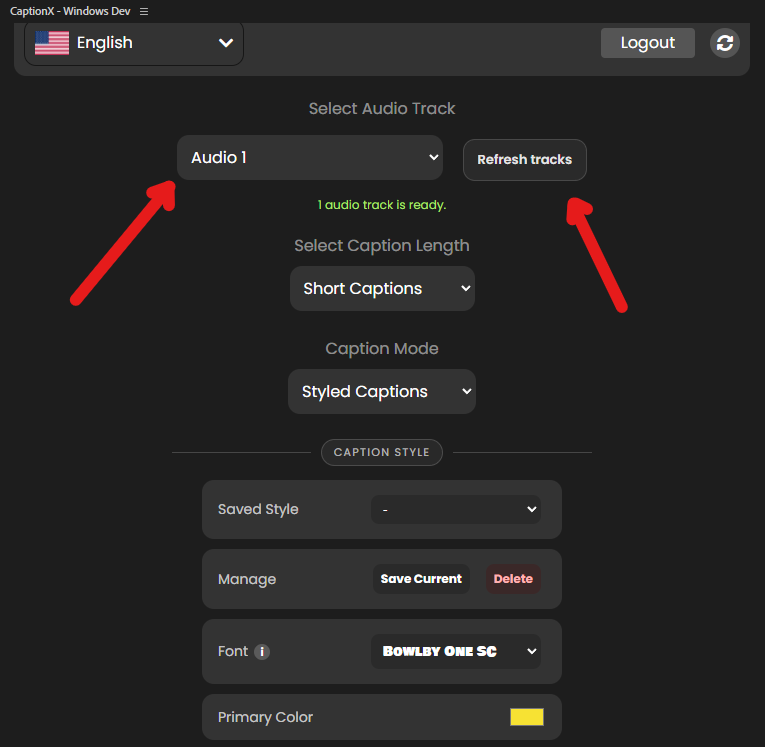
Comparing more options? See our ranking of the best caption plugins for Premiere Pro, or how CaptionX compares with Premiere Pro's built-in captions.
Captioneer in After Effects vs CaptionX in After Effects
Both work in After Effects. Captioneer added After Effects in version 1.7.0 on January 26, 2026. CaptionX for After Effects is a panel for After Effects on Windows and macOS that does more than captions, and the same account signs you in to Premiere Pro and DaVinci Resolve.
CaptionX in After Effects
- Animated captions from 10 templates, word by word: one layer per caption with Essential Properties, so the words, colours and position stay editable.
- Editable Text captions as a single text layer with a keyframe per caption, with an optional highlight on the spoken word.
- Translates your captions into 89 languages, added as a separate layer.
- A Silence Remover and Eye Contact Correction in the same panel.
- Free to start with no expiry date. Supports After Effects 2026; After Effects 2025 may still work.
Captioneer in After Effects
- Creates text layers or Essential Graphics precomps.
- Transcribes on your computer, after a speech model download of 41.5 MB to 2.9 GB.
- Lists no translator of its own, no silence removal and no eye contact correction (checked October 13, 2026).
- No free plan: a 14-day trial, then a paid licence.
Does Captioneer work in DaVinci Resolve?
No. Captioneer's FAQ says it isn't available for DaVinci Resolve or Final Cut Pro, because the .mogrt templates it uses are only available in Adobe's ecosystem. It works in Premiere Pro and After Effects.
CaptionX for DaVinci Resolve is available on Windows and Mac: download it here. You can also caption a Resolve project with an SRT file from CaptionX Studio:
- Upload your clip to CaptionX Studio in your browser (up to 10 minutes and 2 GB per clip).
- Generate captions, fix any words, and download the SRT file. The SRT is free and doesn't need a sign-in.
- In DaVinci Resolve, right-click in the Media Pool, choose Import Subtitle, then edit the subtitle clip onto your timeline.
Resolve's own Create Subtitles from Audio feature needs the paid DaVinci Resolve Studio.
The Captioneer alternative that's free to start, with no expiry
Our verdict: for captions in Premiere Pro and After Effects, CaptionX is the better choice. It does the same job, runs in more places, does more once the captions are done, costs less per month in the US, and it's free to start.
Don't take our word for it. Install both and compare them on your next edit: CaptionX is free to start, so it costs nothing to check.
What you get with CaptionX:
- a free start, with no trial clock
- one account for Premiere Pro, After Effects and DaVinci Resolve
- a Silence Remover and Eye Contact Correction in the same panel as your captions
- your captions translated into 89 languages
- CaptionX Studio and free SRT tools in your browser
- no speech models to download
- a yearly plan ($139.00 USD a year in the US)
Not in Captioneer, according to its own site and docs (October 13, 2026):
- a free plan: it's a 14-day trial, then a paid licence
- DaVinci Resolve, or a browser version
- silence removal or eye contact correction
- a translator of its own
- a yearly plan
Comparing more tools? See the full CaptionX comparison hub.
FAQ about Captioneer
Is Captioneer free?
No. Captioneer has no free plan. It has a 14-day free trial for short-form captions, and after the trial you need a paid licence: $15.00 USD a month or $150.00 USD one-time, plus any applicable tax (captioneer.com, October 13, 2026). CaptionX is free to start in Premiere Pro, with no expiry date.
Is CaptionX better than Captioneer?
We built CaptionX to be the better caption plugin, and the facts on this page back that up. CaptionX is free to start with no expiry date; Captioneer has a 14-day trial. CaptionX runs in Premiere Pro, After Effects, DaVinci Resolve and your browser; Captioneer runs in Premiere Pro and After Effects. CaptionX has a Silence Remover, Eye Contact Correction and its own translator for 89 languages; Captioneer's site and docs list no silence removal, no eye contact correction and no translator of its own (checked October 13, 2026). In the US, CaptionX Pro costs less per month: $13.95 USD against $15.00 USD. CaptionX has more than 80,000 sign-ups in 140+ countries; Captioneer's site and docs give no user numbers. The simplest test is to install both and compare them on your next edit: CaptionX is free to start, so it costs nothing to check.
Is there a free download of Captioneer?
Only the 14-day trial. It's the one legitimate free way to use Captioneer, and Captioneer allows one trial per computer. After it ends you need a paid licence. If you want a Premiere Pro caption plugin with no trial clock, CaptionX is free to start, with no expiry date.
How much does Captioneer cost?
On October 13, 2026, captioneer.com listed $15.00 USD a month or $150.00 USD one-time, per licence, plus any applicable tax at checkout. There's no yearly plan, and an Enterprise plan for teams is priced per order. Captioneer's FAQ lists a 30-day refund guarantee, a student discount (by email) and discounts for some countries (shown as a banner on captioneer.com). CaptionX Pro is $13.95 USD a month or $139.00 USD a year in the US, so it costs less per month, and a year of Pro costs less than twelve months of Captioneer's subscription ($180.00 USD before tax). Outside the US, our pricing page shows your country's price, which can be higher or lower than the US price.
Does Captioneer work in After Effects?
Yes, since version 1.7.0 (January 26, 2026). CaptionX works in After Effects too, on Windows and Mac, and does more there: animated word-by-word captions that stay editable, translation into 89 languages, a Silence Remover and Eye Contact Correction, all in one panel. It's free to start, with no expiry date.
Does Captioneer work in DaVinci Resolve?
No. Captioneer's FAQ says it isn't available for DaVinci Resolve or Final Cut Pro, because the .mogrt templates it uses are only available in Adobe's ecosystem. It works in Premiere Pro and After Effects. CaptionX for DaVinci Resolve is available on Windows and Mac. CaptionX Studio also makes an SRT file in your browser, and DaVinci Resolve imports .srt subtitle files with its Import Subtitle command.
Can Captioneer translate captions?
Not by itself. Captioneer's FAQ says it uses Premiere Pro's built-in caption translation, and puts Adobe's support at 27 languages (checked October 13, 2026). CaptionX has its own translator: it translates your captions into 89 languages in Premiere Pro and After Effects, and adds the translation beside the originals.
Does Captioneer remove silences or correct eye contact?
Captioneer's site and docs list no silence removal and no eye contact correction (checked October 13, 2026): it is a captions extension. CaptionX includes a Silence Remover and Eye Contact Correction in the same panel as its captions, in Premiere Pro, After Effects and DaVinci Resolve.
Is there a Captioneer alternative that's free to start, with no expiry?
Yes. CaptionX is a caption plugin for Adobe Premiere Pro, After Effects and DaVinci Resolve, on Windows and macOS. It's free to start, with no expiry date, and in the US, Pro is $13.95 USD a month or $139.00 USD a year. CaptionX Studio also makes captions and SRT files in your browser.
How we checked: Captioneer's prices, trial and features come from captioneer.com (pricing and changelog), docs.captioneer.com (its full documentation, including the FAQ, Licenses, Download, Changelog and After Effects pages) and Captioneer's checkout, all checked October 13, 2026. DaVinci Resolve details come from Blackmagic Design's DaVinci Resolve 21 Reference Manual (July 2026). CaptionX prices come from our own pricing data, last checked against our live Stripe prices on August 8, 2026, and other CaptionX details come from our own product. CaptionX's usage figures come from our own records on October 13, 2026: accounts created, countries with ten or more accounts, and hours billed by our speech-to-text provider. CaptionX for After Effects was tested on After Effects 2025 and 2026.
Captioneer is a product of Captioneer LLC. CaptionX isn't affiliated with or endorsed by Captioneer LLC. Prices and features change, so check each company's site before you buy.
Related articles
Try it free
Caption in Premiere Pro and After Effects, Free to Start
Free to start, with no expiry date and no trial clock. Also for DaVinci Resolve, plus CaptionX Studio in your browser and free subtitle tools.