
After Effects subtitles: what it can and can't do
After Effects is a motion design app. It gives you complete control over how text looks and moves, but none of the caption features an editing app has. We checked each of these in After Effects 2026:
| What you want | In After Effects |
|---|---|
| Subtitles typed as text layers | Yes. Layer › New › Text, then time each one. |
| Automatic subtitles from speech | No. There is no transcribe or captions command. |
| Import an SRT file | No. An .srt is not a valid file type for import. |
| A caption track | No. Subtitles are layers in your composition. |
| Closed captions in the export | No. Layers are part of the picture, so subtitles are burned in. |
So the choice is between typing and timing every line yourself, and letting a plugin do the transcription and the timing.
How to add captions in After Effects automatically
CaptionX for After Effects is a panel inside After Effects, on Windows and Mac. It transcribes the speech in your composition in 100+ languages and adds the captions to it. It's free to try.
- 1
Install CaptionX
Close After Effects, download the installer below and run it. It needs no admin password.
- 2
Open the panel
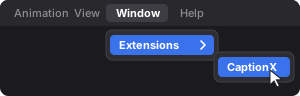
In After Effects, click Window › Extensions › CaptionX and sign in. A free account is all you need.
- 3
Open your composition and pick a style
Choose an animated template such as Word Pop, or switch to Editable Text for plain or styled subtitles. Then choose the layer whose audio has the speech.
- 4
Click Create Captions
CaptionX transcribes the audio and shows you the transcript, so you can fix a word before anything is added. Then the captions are added to your composition.

What you get depends on the kind of caption. Animated captions are one layer per caption, each with Essential Properties for its words, colours and position, kept together in a CaptionX Captions composition on top of yours. Editable Text captions are a single text layer with a Source Text keyframe per caption.
Free to try. Supports After Effects 2026. After Effects 2025 may still work. The Mac download runs on Intel and Apple silicon.
How to add text in After Effects and time it as subtitles by hand
This is the built-in way. It works in every version of After Effects, and it's fine for a handful of lines.
- 1
Make a text layer
Choose Layer › New › Text, or pick the Horizontal Type tool (Ctrl+T on Windows, Cmd+T on Mac) and click in the Composition panel. Type the first subtitle and set the font, size and colour in the Character panel.
- 2
Place it
Drag the text to the lower part of the frame and centre it with the Paragraph and Align panels.
- 3
Keyframe the words
Open the layer in the timeline, then Text. Click the stopwatch beside Source Text. Move the playhead to where the next line starts, then type the new line: After Effects adds a keyframe there. Repeat for each line, and delete the words where there should be a gap.
- 4
Check the timing
Play the composition and drag any keyframe that's early or late. Source Text keyframes hold their value, so each subtitle stays up until the next keyframe.
One text layer per subtitle works too: duplicate the layer (Ctrl+D or Cmd+D), change the words, and trim where it starts and ends with Alt+[ and Alt+] (Option+[ and Option+] on a Mac). That gives you a layer to animate for each line, and a much longer timeline.
After Effects SRT import: how to add an SRT file
You can't drag an SRT file into After Effects. We tried it in After Effects 2026, and the answer is that the file “is not a valid file type for import.” That leaves three options:
- A script that reads the SRT. Third-party scripts build text layers from an SRT file. Digital Anarchy publishes a free one called SRT Importer. Check that the script you choose supports your version of After Effects.
- Premiere Pro. Premiere Pro imports an SRT file as a captions track. If your edit lives there, add the subtitles in Premiere Pro and keep After Effects for the shots that need it.
- Skip the file. If the SRT would only be a transcript of the speech in your composition, CaptionX makes the captions from the audio directly, so there is no file to import.
Animated subtitles in After Effects
Animating subtitles is what After Effects is for. By hand, you add text animators to a text layer and keyframe them, line by line. For word-by-word captions that follow the speech, every word needs its own timing.
CaptionX does that part for you. Its 10 animated templates, including Word Pop and Word Fill, are timed to each word of the speech. Each caption is added as its own layer, so you can still change the words, colours and position afterwards, or restyle every caption at once from the panel.
How to export subtitles from After Effects
Subtitles in After Effects are layers, so they are always part of the picture: render your composition and the subtitles are burned in. These are open captions, which every viewer sees. After Effects has no caption track and doesn't write caption files, so for closed captions (the kind viewers switch on and off) you need a separate caption file, such as an .srt, made somewhere else. CaptionX Studio makes one in your browser.
Questions
How do I add subtitles in After Effects?
There are three ways. Automatically: a plugin such as CaptionX transcribes your composition and adds the subtitles for you. By hand: make a text layer with Layer › New › Text and set a Source Text keyframe wherever the words change. From a file: After Effects doesn't import SRT files itself, so an SRT needs a script that turns it into text layers.
Can After Effects create subtitles automatically?
Not by itself. After Effects 2026 has no transcribe or captions command: Adobe's automatic captions are part of Premiere Pro. A plugin such as CaptionX transcribes the speech and adds the subtitles to your composition.
How do I add captions in After Effects automatically?
Install CaptionX, click Window › Extensions › CaptionX in After Effects, pick a caption style, choose the layer with the speech and click Create Captions. CaptionX transcribes the audio and adds the captions to your composition, where you can still edit them.
How do I import an SRT file into After Effects?
After Effects doesn't import SRT files: After Effects 2026 answers that an .srt is not a valid file type for import. You need a script that reads the file and builds text layers from it, or you can add the SRT in Premiere Pro, which imports it as a captions track.
How do I add text in After Effects?
Choose Layer › New › Text, or pick the Horizontal Type tool (Ctrl+T on Windows, Cmd+T on Mac) and click in the Composition panel, then type. The text is a layer in your timeline that you can move, trim and animate like any other.
How do I make animated subtitles in After Effects?
By hand, with text animators and keyframes on each text layer. CaptionX adds them for you from templates such as Word Pop and Word Fill, with each word timed to the speech, and each caption stays an editable layer.
Are subtitles made in After Effects open captions or closed captions?
Open captions. After Effects has no caption track, so subtitles are layers in your composition and are always part of the picture you render. Closed captions need a separate caption file, such as an .srt, that a player or platform switches on and off.
How we checked: the After Effects details on this page were checked in After Effects 2026 (version 26) on October 13, 2026, including importing an .srt file and looking for transcribe and captions commands. CaptionX details come from our own product. SRT Importer is a product of Digital Anarchy; CaptionX isn't affiliated with it.