Only in DaVinci Resolve Studio
Resolve's own Create Subtitles from Audio is part of the paid Studio version. In the free version of DaVinci Resolve it isn't available, so captions mean typing them or importing an SRT file made somewhere else.

CaptionX for DaVinci Resolve · Now on Windows and Mac
CaptionX is an auto captions plugin for DaVinci Resolve, including the free version, where Resolve's own automatic subtitles aren't available. It transcribes your timeline and places animated, editable captions on it in 100+ languages.
Free to try. Works with the free version of DaVinci Resolve and with DaVinci Resolve Studio. The Mac download runs on Intel and Apple silicon.
The caption templates CaptionX adds to your timeline, as titles you can still edit.
10 templates
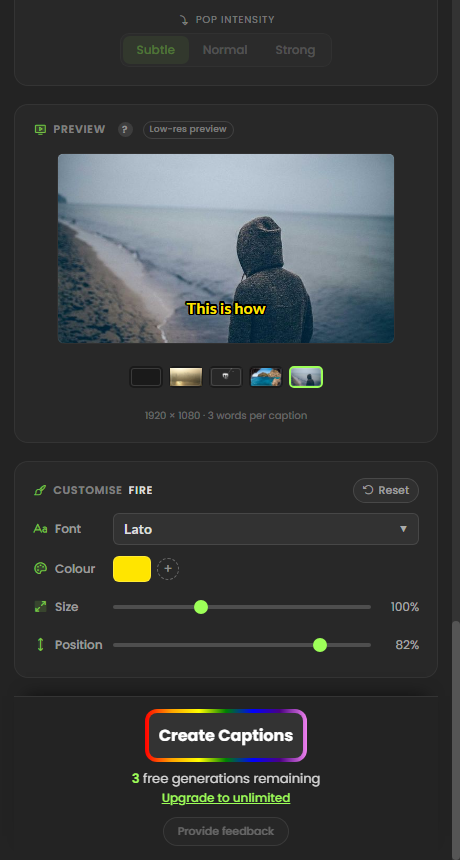
Word-by-word styles and classic Shorts looks. Change the font, colour, size and position before you create, then keep editing the captions in DaVinci Resolve.
Three steps
Run the installer and sign in. A free account is enough to try it.
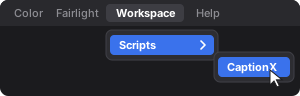
In DaVinci Resolve, click Workspace › Scripts › CaptionX. That connects CaptionX to the timeline you have open.
Pick a template, choose the audio track and language, and click Create Captions. They are added to your timeline.
One app, five tools
Word-by-word styles such as Word Pop and Word Fill, plus classic Shorts looks. Change the font, colour, size and position, and keep editing the captions in DaVinci Resolve afterwards.
Plain or styled captions with your choice of caption length, font, colours, background and casing, with a preview before anything is added.
Translate your Editable Text captions into 89 languages in one step. The translated captions are added to your timeline as their own track, and your original captions are left as they are.
Make the speaker look into the camera in talking-head and interview clips.
More about Eye Contact CorrectionFind the silent sections of your timeline, review the cuts, and apply them to a new copy of the timeline.
More about Silence Remover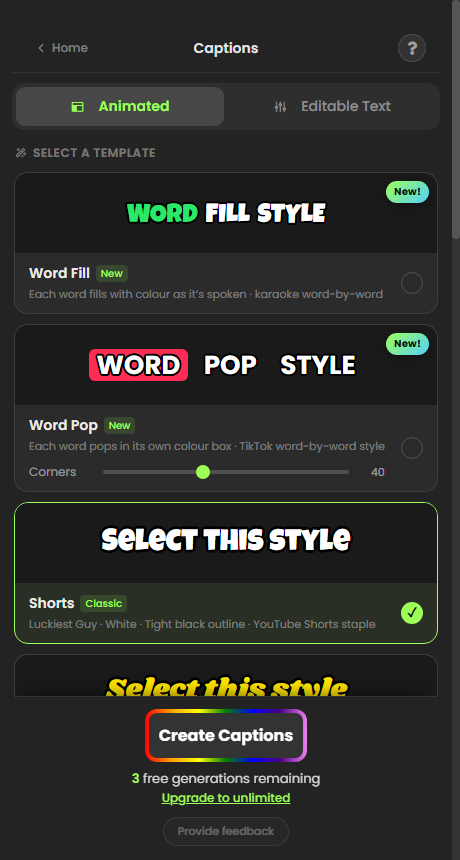
Why a plugin
DaVinci Resolve auto subtitles come from Create Subtitles from Audio, which is part of DaVinci Resolve Studio. It has a capable transcription engine for the languages it supports. The limits show up when you edit in the free version, need another language, or work on a slower computer.
Resolve's own Create Subtitles from Audio is part of the paid Studio version. In the free version of DaVinci Resolve it isn't available, so captions mean typing them or importing an SRT file made somewhere else.
Resolve Studio's built-in transcription covers about 14 languages, with more offered as an extra download in recent versions. CaptionX transcribes 100+ languages, including Arabic, Hindi, Urdu, Indonesian, Thai and Vietnamese.
Resolve transcribes on your own machine, so longer timelines take longer on slower computers. CaptionX transcribes on our servers and only builds the captions in Resolve.
One account
CaptionX is also an extension for Adobe Premiere Pro on Windows and macOS. The same CaptionX account signs you in to both, so you can caption in whichever editor a project needs.
CaptionX for Premiere Pro
Questions
DaVinci Resolve automatic subtitles are a Studio feature: the paid version can create subtitles from audio (Timeline, then Create Subtitles from Audio; some versions list it under AI Tools). The free version of DaVinci Resolve does not include it. CaptionX adds auto captions to both.
Yes. CaptionX works with the free version of DaVinci Resolve. Install it, click Workspace, then Scripts, then CaptionX inside Resolve, and CaptionX transcribes your timeline's audio and adds the captions to your timeline.
Yes, on Windows and Mac. Download the installer for your computer from this page. The Mac version runs on Intel and Apple silicon.
Open your timeline in DaVinci Resolve and click Workspace, then Scripts, then CaptionX. In the CaptionX window, pick a caption template, choose the audio track and language, and click Create Captions. The captions are placed on your timeline, where you can still edit them.
CaptionX transcribes speech in 100+ languages, including Arabic, Hindi, Urdu, Indonesian, Thai and Vietnamese. It can also translate Editable Text captions into 89 languages and add the translation as a separate track.
Yes. After you create Editable Text captions, CaptionX offers to translate them: choose one of 89 languages and the translated captions are added to your timeline as a separate track, so the originals stay untouched.
Yes. Animated captions are added to your timeline as titles you can still edit in DaVinci Resolve, and CaptionX shows the transcript for review before it places anything. You can also change a template's font, colour, size and position before you create.
You can try CaptionX with a free account, which includes a limited number of free caption generations. Paid plans are listed on our pricing page.
Yes. CaptionX sends the audio of your timeline to our servers to transcribe it, then builds the captions in DaVinci Resolve on your computer.
Download CaptionX for DaVinci Resolve and caption your next timeline in 100+ languages.
Free to try. Works with the free version of DaVinci Resolve and with DaVinci Resolve Studio. The Mac download runs on Intel and Apple silicon.